Thursday, 18 June 2009

iPhone OS 3.0 - Safari Geolocation

Having installed iPhone OS 3.0 today, the first thing I wanted to play with (after MMS and Copy/Paste) was the Safari Geographical Location support.

The best example code I found was this iPhone 3.0 geolocation javascript API example... however for some reason the Google 'static map' images wouldn't work for me. I'm not 100% sure why (since the blog post appears to show it working) - but Safari on the iPhone does handle http://maps.google.com URLs in a special way (at least it does if they're anchor/links, in which case it triggers the Maps application).

Anyway, since I was keen to get "something" working, I Googled a basic 'image passthrough proxy' - which seemed to fix the problem.
iPhone safari geolocation

The HTML and javascript is very simple (it's repeated from here).

function handler(location) {
var message = document.getElementById("message");
var loc = location.coords.latitude + "," + location.coords.longitude;
message.innerHTML = "<img src='MapImageHandler.aspx?centerPoint="+ loc +"' />";
message.innerHTML+="<p>Longitude: " + location.coords.longitude + "<br />";
message.innerHTML+="Latitude: " + location.coords.latitude + "<br />";
message.innerHTML += "Accuracy: " + location.coords.accuracy + "</p>";
}
navigator.geolocation.getCurrentPosition(handler);
The MapImageHandler.aspx code is also very short (and was sourced from here).

That's about the most basic geolocation sample you could... now to find something useful to do with it! Thanks to the two authors of the code I stitched together (blog.bemoko.com and guy off CodeProject).

Wednesday, 17 June 2009

Customizing Bing (on your site)

It's fairly easy to create a site-specific, bing-powered search box, using the basic wizard at www.bing.com/siteowner.

However, it turned out to be less obvious how to 'customize' it's behaviour... specifically I wanted the search to search 'sites in Australia' by default. The final result is shown below, and you can try it here


Working with Advanced Queries in the Windows Live Search Box provides some hints about how you can customize the javascript var WLSearchBoxConfiguration={...} which controls how the search box works.

By default it looks like this
var WLSearchBoxConfiguration=
{
"global":{
"serverDNS":"www.bing.com",
"market":"en-AU"
},
"appearance":{
"autoHideTopControl":false,
"width":600,
"height":400,
"theme":"Blue"
},
"scopes":[
{
"type":"web",
"caption":"&#x57;&#x65;&#x62;",
"searchParam":""
}
]
}
which provides a simple web search. To force the search to be "only for sites from Australia" we needed to add a new scope with a searchParam set:
"searchParam":"loc:AU"

Restricting to a specific site/domain is more obvious:
"searchParam": "site:conceptdev.blogspot.com"


It ends up looking like this:
var WLSearchBoxConfiguration=
{
"global":{
"serverDNS":"www.bing.com",
"market":"en-AU"
},
"appearance":{
"autoHideTopControl":false,
"width":600,
"height":400,
"theme":"Blue"
},
"scopes": [
{
"type": "web",
"caption": "this site",
"searchParam": "site:conceptdevelopment.net"
}
,
{
"type": "web",
"caption": "ConceptDev Blog",
"searchParam": "site:conceptdev.blogspot.com"
}
,
{
"type":"web",
"caption":"&#x57;&#x65;&#x62;&#x20;&#x28;&#x41;&#x75;&#x73;&#x74;&#x72;&#x61;&#x6C;&#x69;&#x61;&#x29;",
"searchParam":"loc:AU"
}
,
{
"type":"web",
"caption":"&#x57;&#x65;&#x62;&#x20;&#x28;&#x61;&#x6c;&#x6C;&#x29;",
"searchParam":""
}
]
}
It doesn't look like you need to worry too much about the ASCII-Hex encoding for simple characters (although if you want to encode them, there are plenty of tools).

Tuesday, 9 June 2009

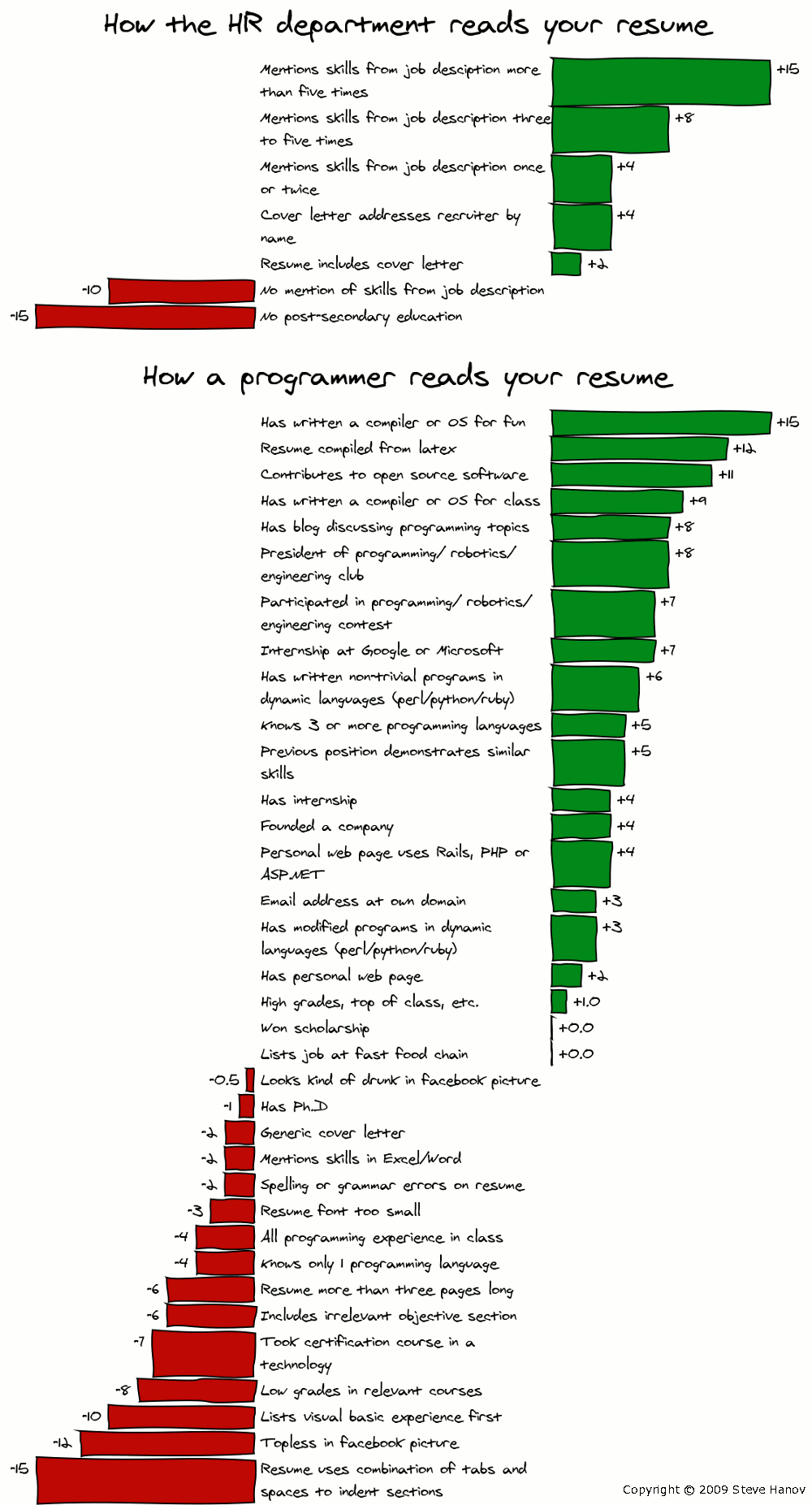
How I read a resumé...

I came across this graphic today - linked from a great post on How to apply for a professional job - and had to post a link to it. Many of the points are funny/humorous - generally because they're (kinda) true! All the ones about attention-to-detail in your CV are 100% spot-on.

Wednesday, 27 May 2009

Twitter spam=FAIL (UPDATE Customer Service=WIN)

Update Nov-09: It's been a few months since I 'let off steam' with the post below. It sounds a bit over-the-top reading it now. Anyway, as you can see in the comments I was recently contact by the company directly and I couldn't be more impressed with how they handled my 'complaint'. That sort of honesty in customer service deserves another look. The remainder of the post reads 'as it was'.

In the normal course of tweeting today, I happened to post
Argh - moving an ASP.NET app that requires Crystal Reports for VS 2003... oh the humanity
Nothing special about that - I often complain about stuff on Twitter... but mostly programming and stuff, not specific products or companies (see When Word of Mouth Got a Permalink) so I was unprepared for what happened next...


W.T.F.!? Okay so Twitter is totally open and there are all sorts of search-bots BUT give-me-a-break with the crappy marketing line and unattended twitter account.


Phew now I feel better :-)

Thursday, 14 May 2009

Microsoft Translator Widget

The Microsoft Translator Widget has been popping up on various sites recently - and now some of mine...

ConceptDevelopment.net in Spanish


Geoquery2008.com in Japanese


It's difficult to tell how useful this will be - unless Google can 'discover' this content is available in other languages it will be difficult to attract foreign-language traffic to Translator-enabled sites. It's all client-side/script-driven, so Google isn't going to get any translated content under normal spidering conditions. Those who land on the content organically may find it helpful I suppose...
I wonder if Live Search does anything special for Translator sites?

Tuesday, 12 May 2009

Draw on Silverlight Virtual Earth Map Control

There are a couple of different projects where I'd like to enable 'drawing' on a map (including RaceReplay.net) - this is a basic first-cut of drawing within the Microsoft VE Map Control.

Each click on the map will start/continue a line. The MouseLeave event is wired to start a 'new' line. Navigating the map (dragging/double-click zoom) also causes points to be drawn - obviously this needs some work...


The two files required to build it are Page.xaml and Page.xaml.cs, the key pieces of code being
private void VEMap_MouseLeftButtonDown(object sender, MouseButtonEventArgs e)
{
Map m = (Map)sender;
Location l = m.ViewportPointToLocation(e.GetPosition(m));
if (polyline == null)
CreateNewPolyline(l);
else
polyline.Locations.Add(l);
}
and
private void CreateNewPolyline(Location startPoint)
{
polyline = new MapPolyline();
polyline.Stroke = new SolidColorBrush(Colors.Red);
polyline.StrokeThickness = 2;
var lc = new LocationCollection();
lc.Add(startPoint);
polyline.Locations = lc;
VEMap.Children.Add(polyline);
}
Simple, eh?

p.s. these are plain old straight lines - at the 'continent' level you might expect them to curve as though on a great-circle; I'm not too worried about implementing that right now since the target usage of my drawing is at a much "smaller scale"... however Geoquery2008 does draw great circle lines correctly...

Saturday, 9 May 2009

Silverlight DataContractJsonSerializer Error

Admittedly there is very little excuse for hand-crafting Json output these days, with libraries like Json.NET available, and WCF supporting Json natively. However, I was tweaking an existing ASPX page (that was actually rendering Xaml for a Silverlight 1.0 application) to turn it into a 'service' for Silverlight 2.0... and it seemed like the fastest way to do that was simply replace a whole pile of <s and >s with {}

I got some hints/reminders on how to Consume a JSON object in Silverlight, and found Jsonlint really helpful in tuning the output until it was valid Json.


Then I created a 'matching' object model in Silverlight C#


and wired up the OpenReadCompleted event using DataContractJsonSerializer


Everything LOOKED like it should work, so at first I was confused by this error message:
Unable to cast object of type 'System.Collections.Generic.List`1[System.Object]' to type 'System.Collections.Generic.Dictionary`2[System.String,System.Object]'

After staring blankly at the code for a while, I finally realised where my Json had gone wrong -- at the very root of my Json response (see Jsonlint image above) I was "accidentally" wrapping the entire Json output with an unnecessary [] pair. I guess this meant the Deserializer was expecting to cast into a collection (albeit with a single element), but I was intending the root Json element to be a single object (to match my C# JsonCourse).

The simple fix was removing the enclosing [] so that my Json started off like this instead:
{
"width": 800 ,
"height": 600 ,
"runners": [
{
"name": "mapcanberramarathon",
"points": [
Lesson for tonight is to better understand the underlying Json representation before consuming it (or else use a library rather than hand-craft the output). Anyway now it is fixed RaceReplay.net 2.0 is that much closer to fruition...

Saturday, 2 May 2009

Silverlight "Maps That Bend Upwards"

I was inspired today by HERE & THERE's horizonless projection of Manhattan (via The Map Room: Maps that Bend Upwards).

Using Silverlight 3.0 beta and it's new PlaneProjection feature, I have hooked up three Silverlight Map Controls with different values for RotationX, GlobalOffsetY (vertical displacement) and GlobalOffsetZ (in/out of the page) to create a very crude 'interactive' version of their horizonless-map.

If you have Silverlight 3.0 beta installed, you can try out the Silverlight Virtual Earth Maps That Bend Upwards OR if you don't have the beta installed, you can watch a screencast.


[try it] [watch it]

I've noticed a little bit of weird behaviour on loading (sometimes the 'initial' map of New York doesn't load completely sync'd in all three panels), but after that it seems to work OK - it's just for fun after all.

Sunday, 26 April 2009

ASP.NET Model View Controller (MVC)

Another 'link collection' (along the lines of my MVVM list)... about ASP.NET MVC (Model View Controller)...
Chris Tavares' Building Web Apps without Web FormsChris explains the MVC concepts and in the process builds a simple wiki-like tool - great because it is a more 'real life application' type example than you'll see elsewhere.
Rob Conory on why You Should Learn MVCRob Conery's well-thought-out argument for giving ASP.NET MVC is a great read, with some classic quotes such as:
WebForms is a lie. It’s abstraction wrapped in deception covered in lie sauce presented on a plate full of diversion and sleight of hand. Nothing you do with Webforms has anything to do with the web – you let it do the work for you.
This, friends, is a big deal (at least to me): You’re working in a lie. The web is *not* stateful and works with this stuff called HTML sent across wires using another thing called HTTP – you need to know this, love this, and feel it at the bone level.
He provides seven excellent reasons to back up his assertion (I'm paraphrasing the headings here, you should read the original text):
  1. Testability - yes, automated testing can be conducted much closer to your 'ui surface' without needing actual ui automation (ala WatiN et al)
  2. Control over Html - no 'funky' id munging or VIEWSTATE!
  3. Extensibility (my favourite so far - the Spark View Engine)
  4. Makes you think - and that's a good thing :)
  5. Javascript has 'come of age'
  6. Learn new concepts - what are those ALT.NET guys on about, anyway?
  7. It's fun!
Jeremy D. Miller's Oversimplified ASP.Net MVC Pros and ConsTo sum up:
  • CON: ASP.NET MVC is a 'version 1' product - so be warned
  • PRO: It's easy to customize and extend, to get around point #1
Simple eh?
The Book
Professional ASP.NET MVC 1.0
Written by the "fantastic four" (Rob Conery, Scott Hanselman, Phil Haack, Scott Guthrie), I can only imagine it's a good read since I haven't bought it (yet)...
However, the first chapter by Scottgu(180+ pages) is a free download!, and you can view the sample app - nerddinner.com and download the code.
K. Scott Allen's MSDN article Life And Times of an ASP.NET MVC ControllerIntroduces Routing, Controllers, Action/ActionResult and Helpers.

AND 6 Tips for MVC Model Binding (and validation) - a hidden gem in the MVC framework!
Models incSlightly OT for a pure MVC post - applies to MVVM or any of the related patterns really - but I agree with the premise: Keep your system/tier/layer/whatever boundaries simple (DTOs) and
if there is more application specific needs than a simple DTO can provide, then create an Application Model
I guess that kinda leads into this discussion on creating View Models in MVC - I wondered about the "IEnumerable as the Model Type" in NerdDinner - Stephen discusses a 'proper' ViewModel approach too (see Listing 5 and 6 - although I'm not sure I'd put it in *Controller.cs necessarily).
Los Techies' Jimmy Bogard's How we do MVCThe 'voice of experience' from 9 months of MVC, including advice like:
  • Thin (not FAT) Controllers
  • Strongly-typed views, and discouraging the dictionary part of ViewData
  • Distinct ViewModels (seperate from the domain)
  • No magic strings
  • receive the EditModel as an action parameter, not some collection object
  • and my favourite advice:
    • Use partials when you have common markup, and the data is in your top-level ViewModel object.
    • Use RenderAction when you have common markup, but the information is orthogonal to the main concern of your view. Think like the "login widget" at the top of every screen. A filter is too much indirection for that scenario, RenderAction is very explicit.

Also links to Jeremy D. Miller's "Opinions" on MVC which is full of more sage advice!
ASP.NET MVC - the websiteMicrosoft's 'official' MVC home page - download the bits, watch videos, download templates, download sample applications and link to many more useful blog posts than described above!
VideosFrom Scottgu:
MSDN documentationIf you must...
Prevent Cross-Site Request Forgery (CSRF) using ASP.NET MVC’s AntiForgeryToken() helperThis is a 'specific feature' unlike many of the above links, but an important one IMO...
Your application can be vulnerable to cross-site request forgery (CSRF) attacks not because you the developer did something wrong (as in, failing to encode outputs leads to XSS), but simply because of how the whole Web is designed to work.
ALL developers of internet-accessible websites should be making themselves familiar with XSS/CSRF: how they work and how to protect against them. If this feature makes that easier/simpler using MVC... then that's probably another reason to use MVC!
Check out Stephen Walther's draft ASP.NET MVC Framework Unleashed bookRead the great draft chapters Stephen has generously posted on his blog, provide feedback and then buy the book!


UPDATED: Added How we MVC and MVC Thunderdome Principle. Both provide exactly the kind of real-world 'lessons learned' that I want to read before starting an MVC project - to know that others have experienced real-world problems, found real-world (and neat) solutions, and shared them. Now I'm free to go and make my own new mistakes :)

UPDATED: You should NOT use ASP.NET MVC if... lists some reasons why MVC may not be for you: "You rely on 3rd party vendor controls for lots of the UI" is a good one which may not be 'immediately obvious' to those looking at MVC for the first time.

Friday, 17 April 2009

Silverlight 3.0 PlaneProjection (with DeepZoom)

I previously built a rather gratuitous PlaneProjection demo flipping around a Silverlight Map Control. A slightly more useful (or at least interesting) use of Silverlight 3.0 PlaneProjection is this Deep Zoom 'tile pyramid visualizer'...


[fullsize image] [try it out]

Rather than just play around with the RotationX and RotationY properties,
  • GlobalOffsetZ is used to 'push back' the larger images to sit 'behind' the smaller, foremost image
  • CenterOfRotation is set to GlobalOffsetZ * -1 so that all the images rotate around the same point
  • RotationY is then used to rotate them all together

Here are some diagrams to explain what that all means:

Firstly, each 'layer' in a Deep Zoom image is double the the size of the previous one (height/width) so when they three layers are rendered on top of each other, you can clearly see the size differences:


However when we apply the PlaneProjection to move the larger images along the Z axis (ie. in/out of the page) we can create the effect that all three images are the 'same size'.

Altering the PlaneProjection attributes listed about let's us zoom and rotate the pyramid to get a totally useless but kinda cool looking view of a Deep Zoom tile pyramid...

UPDATE: For those without Silverlight 3.0 installed, I've recorded (my first!) screencast demo (sorry it's in Flash - something to figure out another time...)

Thursday, 16 April 2009

Re-blog: C# 4.0 feature focus (recommended)

Of all the blogs I follow, the one I most often 'bookmark and re-read' is probably Bart De Smet's (ok, Scottgu too).

I think I first started following Bart in 2006 when I was learning about LINQ - A custom implementation of the .NET Standard Query Operators.

However it was this recent post on C# 4.0: Co- and Contra-Variance for Generic Delegate and Interface Types that prompted this 'recommendation'. It's a perfect example of what I like about many of his posts - I learned a lot! Some of the '3.0 examples' he mentions are just the sort of thing I've noticed, wondered about and worked around before: but Bart provides the "language" and "reasoning" that explains why... sure I've probably heard the terms co- and contra-variance before, and I can understand at some 'high level' why
IEnumerable<Person> people = from Student s in db.Students
where s.Age <= 25
select s;

doesn't (currently) work, but Bart's discussion and examples feel just like the 'developer watercooler' type conversation that might take place amongst developers at work - and suddenly I understand the concepts a lot better.

I enjoy reading (and re-reading, just to fully understand them!) Bart's posts, and highly recommend them.

Tuesday, 14 April 2009

Worst ecommerce website ever MkII

I blogged about how bad IMG Ecommerce's Events Online ecommerce website was last year. It was therefore with some dismay that I had reason to use the same website again, and to find it just as bad one year on.

It starts off poorly with some truly poor UI design: a button group with no default and poor names:


progressing to bad/incomplete user feedback


awful button layout (and one-question-per-form dragging out the process)


only the breadcrumb gives a hint of what to do here


and the piece-de-resistance: TWO buttons labelled Payment!


What a joke of a website from IMG "the world's premier and most diversified sports, entertainment and media company".

Runner Up...

A close second in the abysmal ecommerce website stakes is the Easter Show online ticketing site.

Lowlights include:
  • you must type in a quantity AND PRESS PURCHASE - but that just updates the quantity (it doesn't actually purchase)
  • you must press COMPLETE ORDER when you are done. But if you enter a number in any box and press COMPLETE ORDER it will not recognise that input (back to step 1).
  • note the instructions at the bottom, which might as well say "DO NOT USE YOUR WEB BROWSER THE WAY YOU ALWAYS HAVE FOR EVERY OTHER WEBSITE EVER, or it'll be your fault when your order is screwed up"!


How do these things make it through user testing?

Tuesday, 7 April 2009

Polyline.StrokeLineJoin and tight corners

Sharp corners in Polylines (particularly thick ones) can create unintended artefacts - particularly apparent when converting a (somewhat shaky) GPS track into a line on the Silverlight VE Map Control.

In this screenshot the circled 'line extension' (leading off into the water) is not actually part of the path, but an artefact of a very tight corner:


A few simple additions - StrokeLineJoin being the most important - and the Path looks "correct":

<m:MapPolyline
Stroke="Blue" StrokeThickness="10" x:Name="Course"
StrokeLineJoin="Round"
StrokeEndLineCap="Round"
StrokeStartLineCap="Round"

Locations="-33.84780366140732,151.21159315109253 -33.84504135759562,151.2111210823059 -33.84418591636912,151.2106704711914 -33.84374037067171,151.21082067489624...
/>


Just something to be aware of...

Monday, 6 April 2009

*.MDF' cannot be opened because it is version 655. This server supports version 612 and earlier

When I'm not playing with Silverlight and Virtual Earth, I've been figuring out MVC (thanks to Scott, Scott and Phil). However pretty early on I hit a weird error in Visual Studio 2008 when trying to 'open' a database via the Server Explorer:

The database 'C:\SOME\FOLDER\MYDATABASE.MDF' cannot be opened because it is version 655. This server supports version 612 and earlier. A downgrade path is not supported.

Background

I had created that database in Visual Studio 2008 (File → Add New Item → SQL Server Database) and now it wouldn't let me open it!

What I had done is opened, edited and closed the database file using SQL Server 2008 Management Studio. Shouldn't be a problem, right, since I'm also using Visual Studio 2008?

The Problem

Well, although I currently have SQL Server 2008 installed, I also have SQL Server 2005 (which was installed with Visual Studio 2008 originally). When I created the database originally I just assumed it was a SQL Server 2008 database - but it wasn't (it was 2005)!

Turns out that when you are create or open a file-based (.MDF) database (as opposed to using a database instance or server connection) Visual Studio needs some 'help' knowing what tools to use.

When I edited the *.MDF file in SQL Server 2008, it made some fundamental "changes" to the file (even though I didn't 'upgrade' it) which prevented SQL Server 2005 from opening it. Why was Visual Studio 2008 confused? It's a configuration setting!

To fix the problem, go to Tools → Options... → Database Tools → Data Connections and change the SQL Server Instance Name from whatever it was (probably a SQL Server 2005 instance) to your SQL Server 2008 instance, hit OK and you should be fine!


Thanks to simple-talk; and SQL 2008 Express edition error/Add new item on ASP.NET forms. A bit OT - HTH someone...

Silverlight VirtualEarth Map Control - with video

Okay - I wasn't going to do any more Silverlight VE Map Control posts... this is definitely the last one! I found some videos on YouTube that I thought suited 'animating' a map so I gave it a try. These would work MUCH BETTER if I had Silverlight-encoded videos that I could sync to/control more easily: but you get the idea...

Sydney City2Surf


Sydney Marathon


p.s. YES I know it's dodgy to have to 'sync' the start of each element manually - but without lots of hassle figuring out if the YouTube video is loaded and running it was the easiest way to proof-of-concept...

Friday, 3 April 2009

Script diagrams using SQL Server 2008

Originally this script was ScriptDiagram2005 (on CodeProject), based on a SQL Server 2000 version by Clay Beatty.


I had already tested the '2005' version on "Katmai" betas of SQL Server 2008 and it worked fine, so I hadn't bothered to update the script until I read
this thread (requires login) and learned of the built-in sys.fn_varbintohexstr function.

This made the previous custom function Tool_VarbinaryToVarcharHex redundant, so I have updated the code to ScriptDiagram2008. There isn't really any code to download - just view the script (copy/paste to an .SQL file to apply to your database).

Makes it easy to add your diagrams to source control - still figuring out how to fit it nicely into Visual Studio Team System Database Edition GDR...

Wednesday, 1 April 2009

Silverlight VirtualEarth Map Control - with animation MkII

In recent posts I was working to get the new Virtual Earth Silverlight Map Control (CTP) to:
  1. display (pan/zoom) an <Image> overlay

  2. display (pan/zoom) a <Path> line

  3. animate a set of <Ellipse>s that also (pan/zoom)

  4. animate the map center point to 'track' an <Ellipse>

Turns out this was all possible - there are two examples: New York Marathon and Sydney Half Marathon

Each problem was overcome as follows:

1. Use m:MapLayer.MapRectangle not Height/Width

Any "pixel-specific" measurements applied to the Image will intefere with your Map layout. DO NOT specify Height, Width, Canvas.Left, Canvas.Top - just give the NW and SE corners (latitude,longitude) of the geographic region the image should cover, like this:
<Image Source="map.png" m:MapLayer.MapRectangle="40.8325608405556,-74.1015908473376,40.5722860972124,-73.843755459154"...

2. Use m:MapPolyline not Path

Although it was possible to keep the Path inside a Canvas element and place it with MapRectangle, it did not scale well since the Path Data is effectively tied to pixel coordinates. It is possible to write code to manually scale the line, but it was much easier to re-express the line with points specified by Latitude,Longitude in a m:MapPolyline like this:
<m:MapPolyline Stroke="Red" Locations="-33.863502543277534,151.20294570922852...

3. Use m:MapLayer.Position and a custom attached property

Positioning the Ellipses was easy using m:MapLayer.MapPosition, however animating this property was a little tricky. MapPosition is of Type Location but the Latitude and Longitude properties are not easily accessible as the TargetProperty of an animation, so I needed to write custom attached properties and set them as the target in code.
<Ellipse Fill="#FFFF0000" Width="11" Height="11" m:MapLayer.MapPosition="-33.863502543277534,151.20294570922852" m:MapLayer.MapPositionMethod="Center"...

4. Use m:Map.Center and a custom (hacked) attached property

Making the Map 'viewport' itself animate proved slightly trickier again. I created another attached property (code for all properties here) for some reason only one 'axis' (Longitude) would animate.

When I removed the Longitude property, then the Latitude position would animate... but I could not get them both animating together. Figuring it was a timing issue, rather than try to "set" both properties when they Changed, Latitude gets stuffed into a static field and then set in the LongitudeChanged handler - seems to work but not sure if it's a good idea (obviously it would break if you tried to animate two maps at the same time!)

More info on the final example - no more Map Control posts for a while...

Friday, 27 March 2009

Silverlight VirtualEarth Map Control - with animation

UPDATE: The Microsoft devs were right - it is possible (and not a bug). The 'complete' sample now keeps the image, course line and animated objects visible during all panning and zooming operations - try out
animation with Silverlight Virtual Earth Map Control!

I've made some progress with my first Silverlight Virtual Earth Map Control project...

Try it out (deprecated) latest

Here are some screenshots of the zoom/animation in action:


The code and xaml also online - I needed to (well, I think I needed to) use the ViewChangeEnd event to re-calculate various offsets and dimensions to keep the animation and overlay image sychronised with the Map Controls' zoom behaviour (even though panning worked without modification).

Wednesday, 25 March 2009

OpenSearch 'Visual Search'aroo (for IE8)

About 6 months ago I added OpenSearch.xml to searcharoo.net.

Now that IE8 has been released there is a new "Visual Search" feature that can be enabled via opensearch.xml.

When you visit searcharoo.net, OpenSearch-supporting browsers will provide a visual indicator (eg. this colored arrow) that you can add that site as a Search Provider.


Choose to add Searcharoo.net...


...and tick the box that you want to use search suggestions


Once it is set-up, you will receive real-time feedback/results as you type your search!


I did have some problems implementing it, however. The original post I saw was using a beta, and the latest documentation Search Provider Extensibility in Internet Explorer and XML Search Suggestions Format Specification shows the XML required is slightly different.

This was the opensearch.xml file that actually worked for me:
<?xml version="1.0" encoding="UTF-8"?>
<OpenSearchDescription xmlns="http://a9.com/-/spec/opensearch/1.1/" xmlns:ie="http://schemas.microsoft.com/Search/2008/">
<ShortName>Searcharoo.net</ShortName>
<Image height="16" width="16" type="image/icon">http://www.searcharoo.net/favicon.ico</Image>
<Url type="text/html" template="http://www.searcharoo.net/Search.aspx?searchfor={searchTerms}"/>
<Url type="application/x-suggestions+xml" template="http://www.searcharoo.net/SearchSuggest.aspx?searchfor={searchTerms}"/>
<ie:PreviewUrl type="text/html" template="http://www.searcharoo.net/SearchSuggest.aspx?searchfor={searchTerms}"/>
</OpenSearchDescription>


with the following added to the .master page

<link rel="search" type="application/opensearchdescription+xml" href="/opensearch.xml" title="Searcharoo.net">

I'm still working on improving the output of the search, but you can view it's response to the browser using this URL - http://www.searcharoo.net/SearchSuggest.aspx?searchfor=manhattan (note the addition of xmlns). The XML also supports image/previews, so Searcharoo will need another upgrade to support that too..

Monday, 23 March 2009

MIX 10k entry goes OutOfBrowser

I have updated my MIX 10k Challenge entry to Silverlight 3.0 so itcan run out-of-browser!

You can visit the Silverlight 3.0 version of exploDZ, and install it locally for yourself WARNING: will prompt to install Silverlight 3.0 which is in BETA

1. Right-click and choose to Install


2. Select "where" to install (this is really only where the shortcuts go)


3. Silverlight 3.0 having an out-of-browser experience


This is really only a test of Silverlight 3.0 - exploDZ was just a bit of fun, and there is already an ClickOnce/WPF version at DeepZoomPublisher.com/Viewer.

Code changes

Thanks to Chris' Silverlight 3.0 out-of-browser instructions the ONLY change from the 2.0 to the 3.0 (out-of-browser) version was the following element added to the AppManifest.xml file:

<Deployment.ApplicationIdentity>
<ApplicationIdentity
ShortName="exploDZ"
Title="Out of browser DeepZoom Viewer">
<ApplicationIdentity.Blurb>
exploDZ out-of-browser (Silverlight 3.0)
</ApplicationIdentity.Blurb>
</ApplicationIdentity>
</Deployment.ApplicationIdentity>


What it does

The shortcut created by the 'installer' has a target like this:
"C:\Program Files\Microsoft Silverlight\3.0.40307.0\sllauncher.exe" conceptdevelopment.net.0
I guess that parameter reflects the 'source site' and index of Silverlight OutOfBrowser apps -stored in a safe place somewhere :) stored in Apps\LocalLow\Microsoft\Silverlight\Offline\ (on Windows 7 at least).


The index.html ISN'T the hosting page from the internet - it's a custom Silverlight object tag:


The metadata file contains
LaunchPath=C:\Users\Craig\AppData\LocalLow\Microsoft\Silverlight\Offline\conceptdevelopment.net.0\index.html
SourceDomain=conceptdevelopment.net
OriginalUri=http://conceptdevelopment.net/silverlight3/outofbrowser01/exploDZ.zip
AppID=conceptdevelopment.net.0
Description=exploDZ out-of-browser (Silverlight 3.0)
Title=Out of browser DeepZoom Viewer
Name=exploDZ


How it works?

Who knows??? Tim's Silverlight 3 Out-of-browser Update Model overview is a worthwhile read.

Adobe's AIR out-of-browser host for Html-Javascript and Flash/Flex sits atop WebKit, and from the index.html above it seems likely that OutOfBrowser-Silverlight is also sitting in a little web browser of some description. It's only 500Kb, so it's not IE :) - and there also has to be a Mac version... it doesn't appear to be managed code (or I'd guess Cassini), maybe the Mac one is related to Chiron? Speaking of Mac - this is how it looks in Safari 4 beta...